
About · 歴史

How we got here.

Otori started in early 2026 as a script that renamed music files and put them in the right folder. Nine months and 945 archived builds later, it imports, organises, digs, prepares and plays a whole collection.

945archived builds, each with its own notes
4release lines before and after the name Otori
5workspaces: Import, Library, Discover, Prepare, Perform
5,215 → 166klines of code, from the first archived build to 1.17
557test modules run before each release
How we got here: Deadwax to OtoriEvery archived build from Dead Wax v10.1 to Otori 1.17, 945 in all, drawn as one line each in the style of a DJ waveform overview, with lettered cue markers at the milestones and lanes showing when each capability arrived.EARLY 2026v6 → v9 sorternot archivedDEAD WAX v10 → v21Mar – Jun 2026 · 423 builds · single-file appDEADWAX v22 → v24Jun – Jul 2026 · 249 builds · packaged appDEADWAX QT v15.33 → v18.24Aug – Oct 2026 · 235 buildsOTORI1.0 → 1.1738 buildsv10.1.0v10.2.0v10.2.1v10.2.2v10.2.3v10.2.4v10.2.5v10.2.7v10.2.8v10.2.9v10.3.0v10.3.1v10.3.2v10.3.3v10.3.4v10.3.5v10.3.6v10.3.7v10.3.8v10.3.9v10.4 core patchv10.4.1 core enginev10.4.2 pipeline reportv10.4.2.1 pipeline hotfixv10.4.2.2 artwork verify hotfixv10.4.3 conversion profilesv10.4.3.1 wav tag hotfixv10.4.3.2 wav verify hotfixv10.4.3.3 input check hotfixv10.4.3.4 wav riff hotfixv10.4.4 resolved metadatav10.4.4.1 move stage hotfixv10.4.4.2 skip existing move fixv10.4.7v10.4.8v10.4.9v10.4.10v10.5 bit depth policyv10.5.0v10.5.1v10.5.1 settings ui refactorv10.5.1.1 settings tab hotfixv10.5.1.2 settings tabs directv10.5.1.3 settings ui stabilizationv10.5.1.4 settings hardeningv10.5.1.5 naming preview fixv10.5.1.6 naming preview album fixv10.5.2v10.6 pipeline transparencyv10.6.0v10.7 ui passv10.7.1 suggestion scope conflictsv10.7.2 suggestion actions uiv10.7.3 clickable suggestion togglesv10.7.4 ui consolidation ignorev10.7.5 live preview checked suggestionsv10.7.5.1 preview hotfixv10.7.5.2 track preview hotfixv10.7.6 remix flip parsing fixv10.7.7 music filename semanticsv10.7.7.1 filename guardrailsv10.7.7.2 final filename dedupingv10.7.7.2.1 filename deduping hotfixv10.7.7.2.2 ui topbar dropzonev10.7.7.2.2 va album grouping fixv10.8v10.8.1v10.9v10.9.1v10.9.2v11v11.1v11.2v11.3v11.4v11.4.1v11.5v11.6v11.6.1v11.8v11.8.1v11.8.2v11.9v12.0.1v12.1v12.2v12.3v12.4v12.4.1v12.4.2v12.5v12.6v12.7v12.7.1v12.8v12.9v13.0v13.1v13.2v13.3v13.4v13.5v13.7v14.3v14.3.1v14.3.3v14.3.4v14.3.5v14.3.6v14.4v14.4.1v14.4.2v14.4.3v14.4.4v14.4.5v14.5.2v14.5.2 av14.5.2 cv14.5.2 dv14.5.2 hotfixv14.5.3 bv14.5.3 b hotfix1v14.5.3 cv14.5.3 c hotfix1v14.5.3 dv14.5.4v14.5.5v14.5.5 hotfix1v14.5.5 hotfix2v14.5.5 hotfix3v14.5.6v14.5.8v14.5.9v14.5.10v14.5.11v14.5.12v14.5.13v14.5.13 hotfix launchv14.5.15v14.5.16v14.5.18v14.5.19v14.5.20v14.5.21v14.5.22v14.5.23v14.5.24v14.5.25v14.5.27v14.5.28v14.5.29v15.0v15.0 av15.0 bv15.1v15.1 av15.1 bv15.2 queue columnsv15.2 queue columns fixv15.2 queue columns fix2v15.2 safev15.2 safe launchfixv15.3 a track columnsv15.4 brand assets fix6v15.4 menu patchv15.4 menu patch2v15.4 titlebar patch2v15.5 faux chrome headerv16.0 a custom window frame refinedv16.0 b custom window frame nativeish fix3v16.0 c native menu only safe2v16.0 custom window framev16.0 d custom titlebar menuv16.0 e custom titlebar menu polishedv16.0 f custom titlebar menu polished fixv16.0 g custom titlebar menu strip fixv16.0 i custom titlebar menu topstrip fix2v16.0 j custom titlebar leftmenu rightcontrolsv16.0 k topstrip polishv16.1 a menus plainv16.1 b menus plain no underlinev16.1 c canvas menu textv16.1 d canvas menu smooth switchv16.1 e canvas menu smooth switch fixv16.1 f canvas menu switch poll fixv16.1 menusv16.2 custom dropdown layerv16.2 custom dropdown layer fixv16.2 custom dropdown layer fix2v16.2 j savededits menu renametools popupv16.2 k queue row unifiedv16.2 l queue row polishv16.2 ui cleanup patchv16.3 right pane simplificationv16.4.1 track review restorev16.4.2 track review pipeline guardv16.4.3 a launch fixv16.4.3 metadata pane cleanup plusv16.4.4 metadata controls cleanupv16.4.5 album apply unifiedv16.4.7 track advanced above artworkv16.4.8 track nested advanced and upload imagev16.4.9 light themes builtv16.4.10 logo alignment scale builtv16.4.11 left gutter alignmentv16.4.12 lower left gutter alignmentv16.5.0 essentia tempo keyv16.5.1 a launch fixv16.5.1 windows safe tempo keyv16.5.2 librosa cleanup install hintv16.5.3 skip existing tempo keyv16.5.4 a launch fixv16.5.4 force reanalyze promptv16.5.5 a session skip prompt launch fixv16.5.5 session skip promptv16.5.6 tempo roundingv16.5.7 key display modev16.5.8 a naming tokens for bpm keyv16.5.8 rename analysis tagsv16.5.9 settings scroll cleanupv16.5.10 settings naming cleanup theme fixv16.5.11 settings sections scroll tuningv16.5.12 settings tiering checkbox hover fixv16.5.15 tray first time noticev16.5.16 partial refresh refactor builtv16.5.19 analysis mode logging builtv16.5.20 a watch import mf fixv16.5.20 b tray restore blank popup fixv16.5.20 tray watch import notificationsv16.5.21 import all from watch foldersv16.5.22 settings persistence reset passv16.5.23 metadata editor stability passv16.5.24 album quick review tabv16.5.25 quick review badges wav artist fixv16.5.26 wav metadata override cachev16.5.27 a quick review lossy flag fixv16.5.27 b quick review column layout fixv16.5.27 cached override column and lossy fixv16.5.28 quick review treeview layout passv16.5.29 two stage import pipelinev16.5.31 a import batching launch fixv16.5.31 import batching ui throttling builtv16.5.32 folder fingerprint cachev16.5.33 queue virtualization idle performancev16.5.34 album output title overridev16.5.35 pipeline progress barv16.5.36 a launch fix pipeline varsv16.5.36 ffmpeg smooth progressv16.5.38 segment stage countsv16.5.39 queue dedupe watch guardv16.5.47 stage1 queue batchingv16.6 central refresh schedulerv16.6.4 collapsed mini progressv16.6.6 watch folder in place refreshv16.6.8 a launch fixv16.6.8 virtual path guard external load fixv16.6.9 tempo key ui wiring fixv16.6.11 a launch fix progress methodsv16.6.11 import progress tabs broad pipelinev16.6.12 eta progress fixv16.6.13 progress tabs parallel barsv16.6.14 pipeline slot subtitlesv16.6.17 a large cached import fixv16.6.17 a large cached import fix builtv16.6.17 a large cached import fix built10v16.6.17 a large cached import fix built11v16.6.17 a large cached import fix built14v16.6.17 a large cached import fix built15v16.6.17 a large cached import fix built16av16.6.17 a large cached import fix built17v16.6.17 a large cached import fix built17av16.6.17 a large cached import fix built17bv16.6.17 a large cached import fix built17cv16.6.17 a large cached import fix built2v16.6.17 a large cached import fix built5v16.6.17 a large cached import fix built6v16.6.17 nested quick review state memoryv17.1v17.1 build3v17.1 build5v17.2.1v17.3v17.3.2v17.5v17.6v17.7v17.9v18.0v18.5v18.5.1v18.5.2v18.6.1v18.7.2v18.8v18.8.5v18.8.5.1v18.8.5.2v18.8.5.3v18.8.5.4v18.8.5.5v18.8.5.7v18.10v18.10.1v18.10.4v18.10.5v18.10.6v18.10.7v18.11.1v18.11.3v18.11.5v18.11.7v18.11.8v18.11.8.1v18.11.8.2v18.11.8.7v18.11.8.7.1v18.11.8.7.2v18.11.8.7.3v18.11.8.7.5v18.11.8.7.7v18.11.8.7.9v18.11.8.7.10v18.11.8.7.10.1v18.11.8.7.10.2v18.11.9v18.11.9.1v18.12v18.12.1v18.12.1.1v18.12.2v18.12.3v18.12.4v18.12.6v18.12.7v18.12.7.1v18.12.7.2v18.12.8v18.12.9v18.13.0v18.13.1v18.13.2v18.13.2.1v18.13.2.2v18.13.3v18.13.4v18.13.4.1v18.13.4.2v18.13.4.3v18.13.5v18.13.5.1v18.13.5.2v18.13.6v18.13.6.1v18.13.7v18.13.8v18.13.9v18.13.10v18.13.11v18.13.11.1v18.13.12.1v18.13.12.2v18.13.12.3v18.13.13v18.13.14v18.13.14.1v18.13.15v19.0v19.1v19.3v19.3.2v19.6v19.9v19.11v19.13v19.14v19.14.2v19.36v19.36.5v19.36.6v19.39v19.40v20.0v20.1v20.2v20.4v20.6v20.7v20.8v20.9v20.10v20.11v20.13v20.16v20.19v20.21v20.23v20.33v20.36v21.0v21.1v21.2v21.3v21.4v21.5v21.6v21.7v21.8v21.9v21.10v21.11v21.12v21.13v21.14v21.15v21.16v21.17v21.18v21.19v21.20v21.21v21.23v21.24v21.25v22.1v22.2v22.3v22.4v22.5v22.6v22.7v22.8v22.9v22.10v22.11v22.12v22.13v22.14v22.15v22.16v22.17v22.18v22.19v22.20v22.21v22.22v22.23v22.24v22.25v22.26v22.27v22.28v22.29v22.30v22.31v22.32v22.33v22.34v22.35v22.36v22.37v22.38v22.39v22.40v22.41v22.42v22.43v22.44v22.45v22.46v22.47v22.48v22.49v22.50v22.51v22.52v22.53v22.54v22.55v22.56v22.57v22.58v22.59v22.60v22.61v22.62v22.63v22.63.1v22.63.2v22.64v22.65v22.66v22.67v22.68v22.69v22.70v22.71v22.72v22.73v22.74v22.75v22.76v22.77v22.78v22.79v22.80v22.81v22.82v22.83v22.84v22.85v22.86v22.87v22.88v22.89v22.90v22.91v22.92v22.93v22.94v22.95v22.96v22.97v22.98v22.99v23.0v23.1v23.2v23.3v23.4v23.5v23.6v23.7v23.8v23.9v23.10v23.11v23.12v23.13v23.14v23.15v23.16v23.17v23.18v23.19v23.20v23.21v23.22v23.23v23.24v23.25v23.26v23.27v23.28v23.29v23.30v23.31v23.32v23.33v23.34v23.35v23.36v23.37v23.38v23.39v23.40v23.41v23.42v23.43v23.44v23.45v23.46v23.47v23.48v23.49v23.50v23.51v23.52v23.53v23.54v23.55v23.56v23.57v23.58v23.59v23.60v23.61v23.62v23.63v23.64v23.65v23.66v23.67v23.68v23.69v23.70v23.71v23.72v23.73v23.74v23.75v23.76v23.77v23.78v23.79v23.80v23.81v23.82v23.82.1v23.83v23.84v23.85v23.86v23.87v23.88v23.89v23.90v23.91v23.92v23.93v23.94v23.95v23.96v23.97v23.98v23.99v24.0v24.1v24.2v24.3v24.4v24.5v24.6v24.7v24.8v24.9v24.10v24.11v24.12v24.13v24.14v24.15v24.16v24.17v24.18v24.19v24.20v24.21v24.22v24.23v24.24v24.25v24.26v24.27v24.28v24.29v24.30v24.31v24.32v24.33v24.34v24.35v24.36v24.37v24.38v24.39v24.40v24.41v24.42v24.43v24.44v24.45v24.46v15.33v15.34v15.35v15.36v15.37v15.38v15.39v15.40v15.41v15.42v15.43v15.44v15.45v15.46v15.47v15.48v15.49v15.50v15.51v15.52v15.53v15.54v15.55v15.56v15.57v15.58v15.59v15.60v15.61v15.62v15.63v15.64v15.65v15.66v15.67v15.68v15.69v15.70v15.71v15.72v15.73v15.74v15.75v15.76v15.77v16.0v16.1v16.2v16.3v16.4v16.5v16.6v16.7v16.8v16.9v16.10v16.11v16.12v16.13v16.14v16.15v16.16v16.17v16.18v16.19v16.20v16.21v16.22v16.23v16.24v16.25v16.26v16.27v16.28v16.29v16.30v16.31v16.32v16.33v16.34v16.35v16.36v16.37v16.38v16.39v16.40v16.41v16.42v16.43v16.44v16.45v16.46v16.47v16.48v16.49v16.50v16.51v16.52v16.53v16.54v16.55v16.56v16.57v16.58v16.59v16.60v16.61v16.62v16.63v16.64v17.0v17.1v17.2v17.3v17.4v17.5v17.6v17.7v17.8v17.9v17.10v17.11v17.12v17.13v17.14v17.15v17.16v17.17v17.18v17.19v17.20v17.21v17.22v17.23v17.24v17.25v17.26v17.27v17.28v17.29v17.30v17.31v17.32v17.33v17.34v17.35v17.36v17.37v17.38v17.39v17.40v17.41v17.42v17.43v17.44v17.45v17.46v17.47v17.48v17.49v17.50v17.51v17.52v17.53v17.54v17.55v17.56v17.57v17.58v17.59v17.60v17.61v17.62v17.63v17.64v17.65v17.66v17.67v17.68v17.69v17.70v17.71v17.72v17.73v17.74v17.75v17.76v17.77v17.78v17.79v17.80v17.81v17.82v17.83v17.84v17.85v17.86v17.87v17.88v17.89v17.90v17.91v17.92v17.93v17.94v17.95v17.96v17.97v17.98v17.99v18.0v18.1v18.2v18.3v18.4v18.5v18.6v18.7v18.8v18.9v18.10v18.11v18.12v18.13v18.14v18.15v18.16v18.17v18.18v18.19v18.20v18.21v18.22v18.23v18.24Otori 1.0Otori 1.1Otori 1.1 (Mac Intel)Otori 1.1.1 (Mac Intel)Otori 1.1.2 (Mac Intel)Otori 1.1.3 (Mac Intel)Otori 1.1.4 (Mac Intel)Otori 1.1.5 (Mac Intel)Otori 1.1.5 (Mac ARM)Otori 1.1.6 (Mac Intel)Otori 1.1.7 (Mac Intel)Otori 1.1.7 (Mac ARM)Otori 1.2Otori 1.3Otori 1.4Otori 1.5Otori 1.5 (Mac Intel)Otori 1.5 (Mac ARM)Otori 1.6Otori 1.7Otori 1.8Otori 1.9Otori 1.9 (Mac Intel)Otori 1.9 (Mac ARM)Otori 1.10Otori 1.11Otori 1.11 (Mac Intel)Otori 1.11 (Mac ARM)Otori 1.12Otori 1.13Otori 1.14Otori 1.15Otori 1.15 (Mac Intel)Otori 1.15 (Mac ARM)Otori 1.16Otori 1.17Otori 1.17 (Mac Intel)Otori 1.17 (Mac ARM)Av10.4 FFmpeg core engineBv12.4 Fix All Safe, undoCv16.5.0 Tempo + key analysisDv19.36 Review CenterEv21.24 Three workspacesFv22.13 rekordbox XMLGv22.37 Cues, grids, phrasesHv22.59 DiggingIv23.50 SoundCloudJv15.33 Qt rebuildKv16.0 First betaLv16.28 In-house AnalyzerMv17.6 PerformNv17.75 First Mac buildOv18.3 Two-way DJ syncPv18.13 StemsQ1.0 Deadwax becomes OtoriR1.17 otori.app liveWHAT IT COULD DOImportTempo + keyv16.5.0Libraryv21.1Discoverv21.24rekordboxv22.13Preparev22.37Performv17.6DJ syncv18.3Macv17.75
Every line is one archived build, in release order, drawn like a waveform overview · lettered cues mark the milestones · the lanes show when each part of the app arrived
The tracklist · 曲目

Five chapters, one app

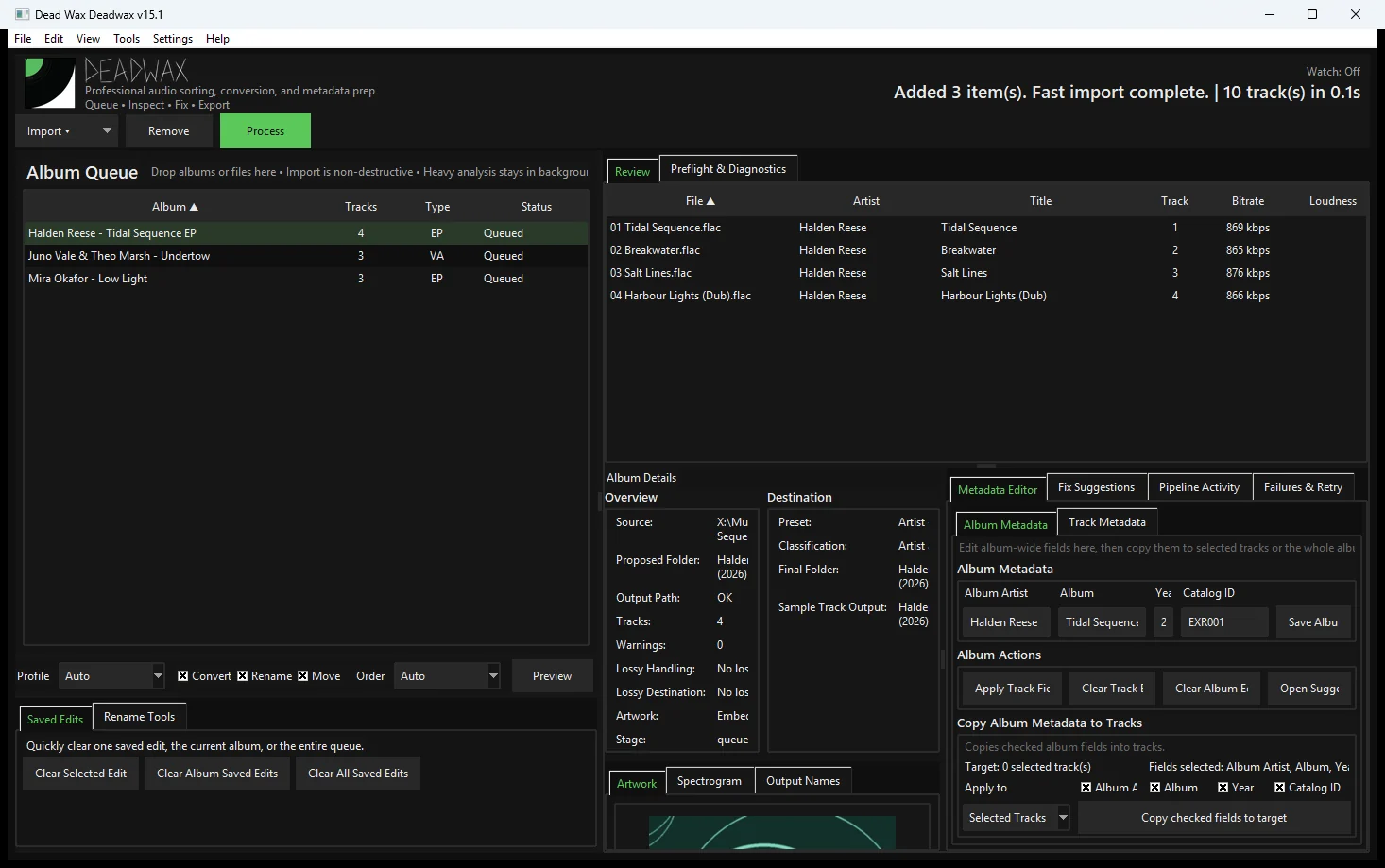
The screenshots are the archived builds themselves, opened again today with the same three demo records loaded into each one.

The sorter

Dead Wax v6 – v9 · Early 2026Not archived

A script that read tags, renamed files and filed them into Artist\Album folders.

  • v7 A full queue rewrite froze the whole machine. Work went back to the stable v6.6.3 and added what lasted: dry runs, a rename preview, queued processing, retries and a Stop button.
  • v8 Conversion failures in an outside converter led to converting with FFmpeg and putting tags and artwork back afterwards.
The single-file app

Dead Wax v10 – v21 · March – June 2026423 builds

One Python file that grew from 5,215 lines to 66,033, and from a grey utility window to a dark, branded app.

  • v10.4 The core engine: FFmpeg conversion profiles, a bit-depth policy, WAV and artwork checks, pipeline reports.
  • v10.5 – v12.4 Naming previews, remix and VIP filename rules, suggestions you tick and preview, Fix All Safe, protected fields, history and undo.
  • v15.4 The first logo and wordmark, and the dark theme.
  • v16.5 Tempo and key analysis for the first time, watch folders, Quick Review and a two-stage import pipeline.
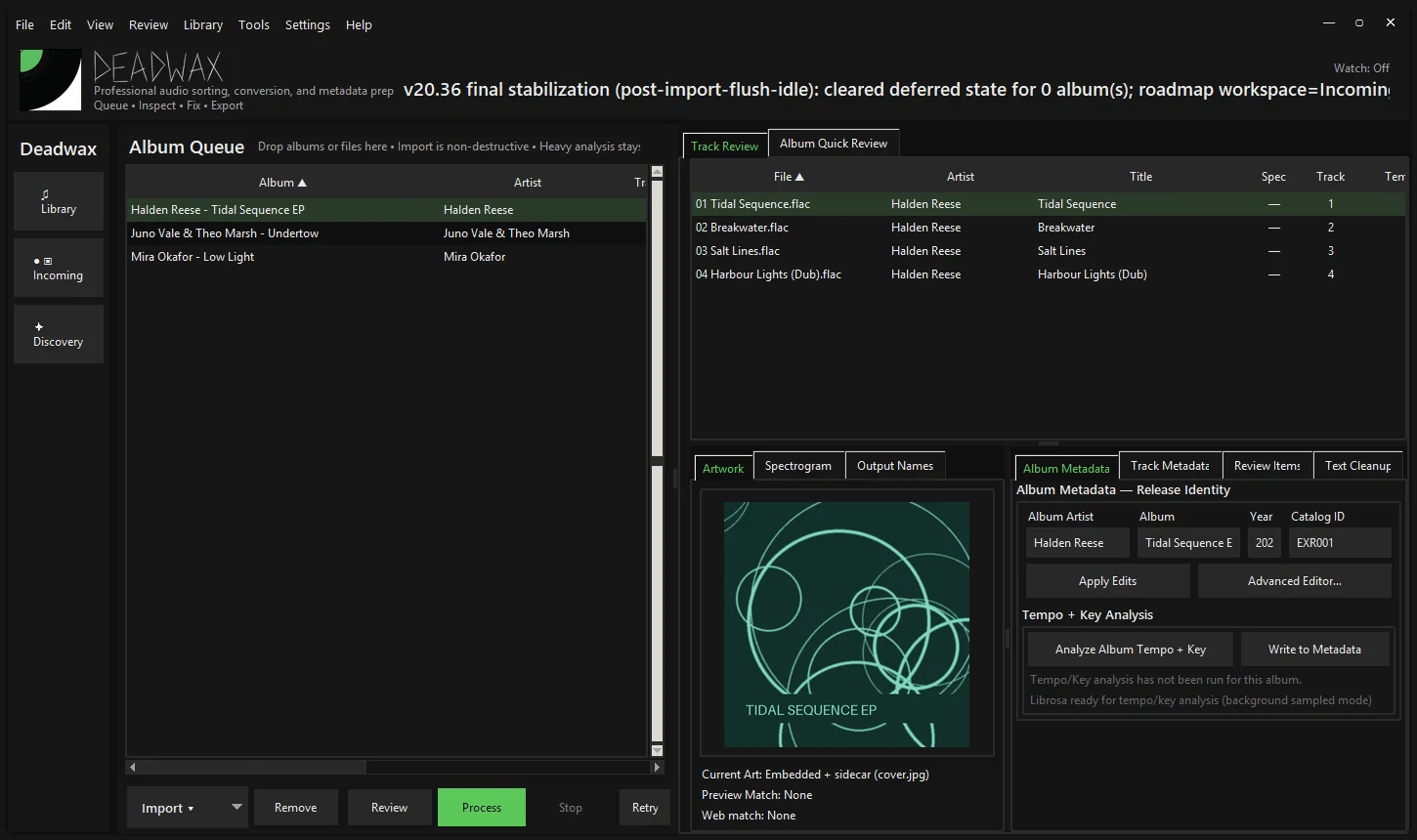
  • v21 A library database, scanner, duplicate fingerprints and import history, then three workspaces: Incoming, Library and Discovery.
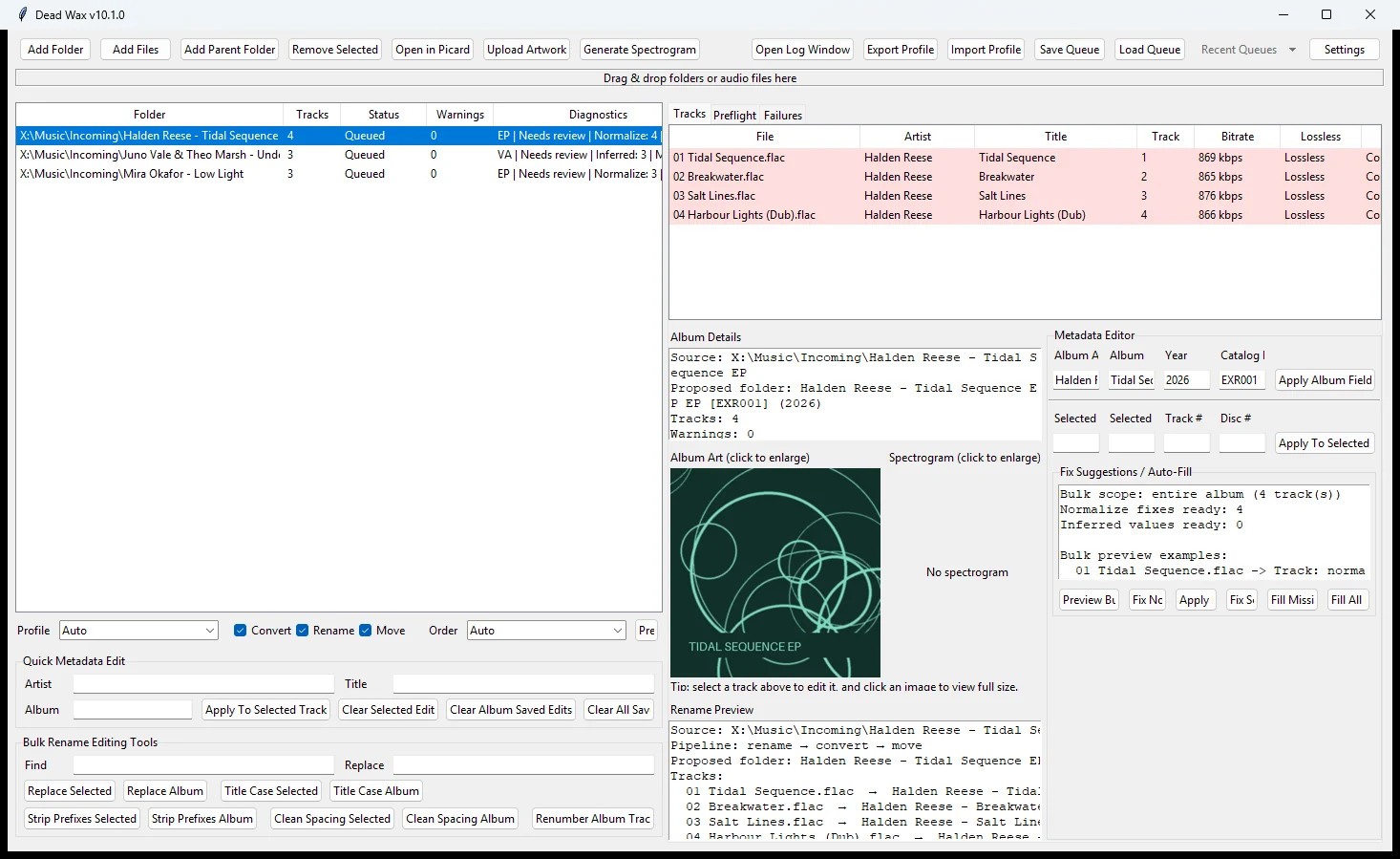
Dead Wax v10.1: The first archived build: a stock grey window with the album queue, tracks, metadata editor and rename preview side by side.
v10.1March 2026The first archived build: a stock grey window with the album queue, tracks, metadata editor and rename preview side by side.
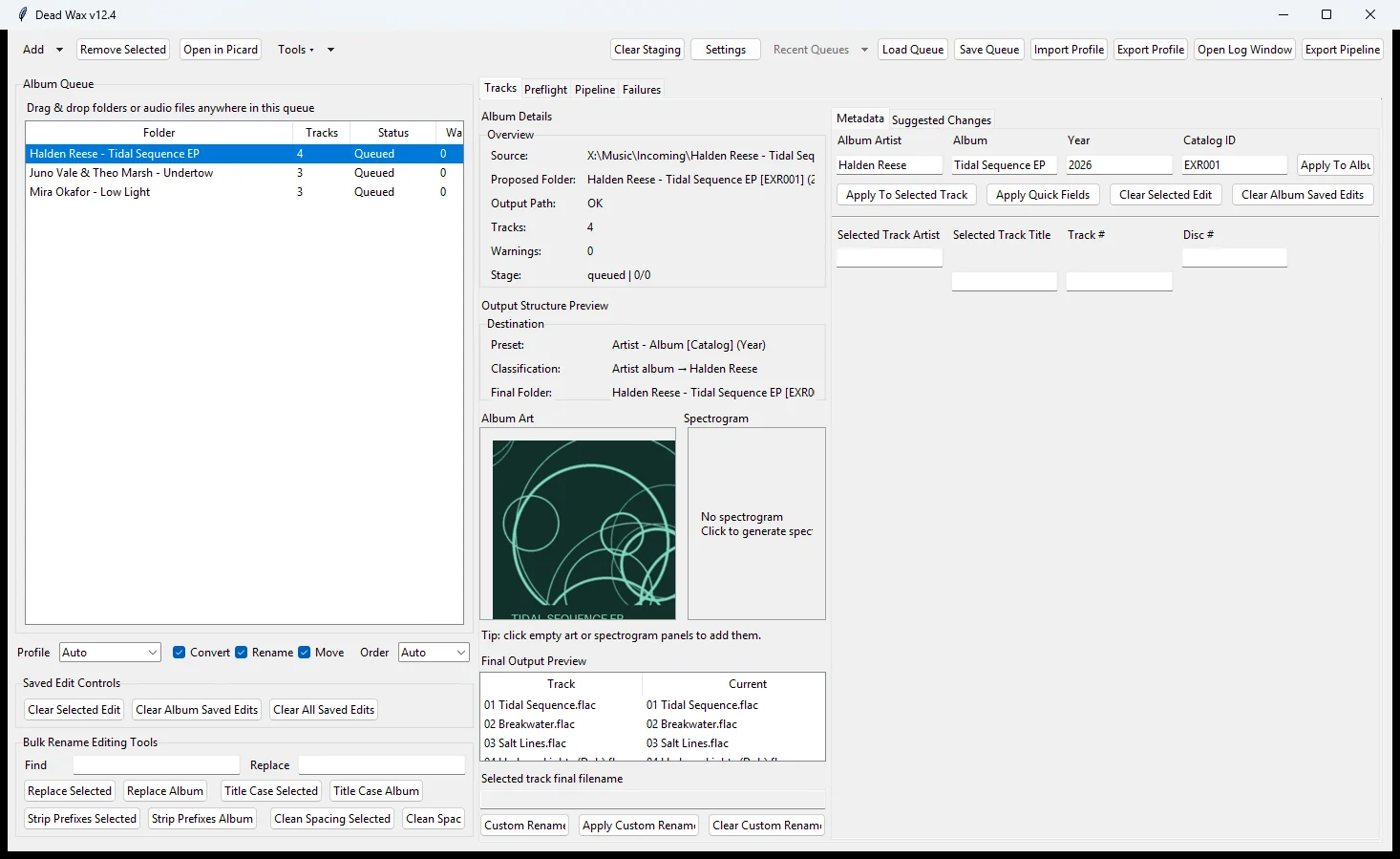
Dead Wax v12.4: Output preview and suggested changes: every rename and move is shown before anything is touched.
v12.4March 2026Output preview and suggested changes: every rename and move is shown before anything is touched.
Deadwax v15.4: The first logo and wordmark arrive, with the dark theme the app has kept ever since.
v15.4March 2026The first logo and wordmark arrive, with the dark theme the app has kept ever since.
Deadwax v21.25: A sidebar with three workspaces, Library, Incoming and Discovery, on top of a new library database.
v21.25June 2026A sidebar with three workspaces, Library, Incoming and Discovery, on top of a new library database.

The packaged app

Deadwax v22 – v24 · June – July 2026249 builds

The single file split into a package with services, tests and release notes for every build.

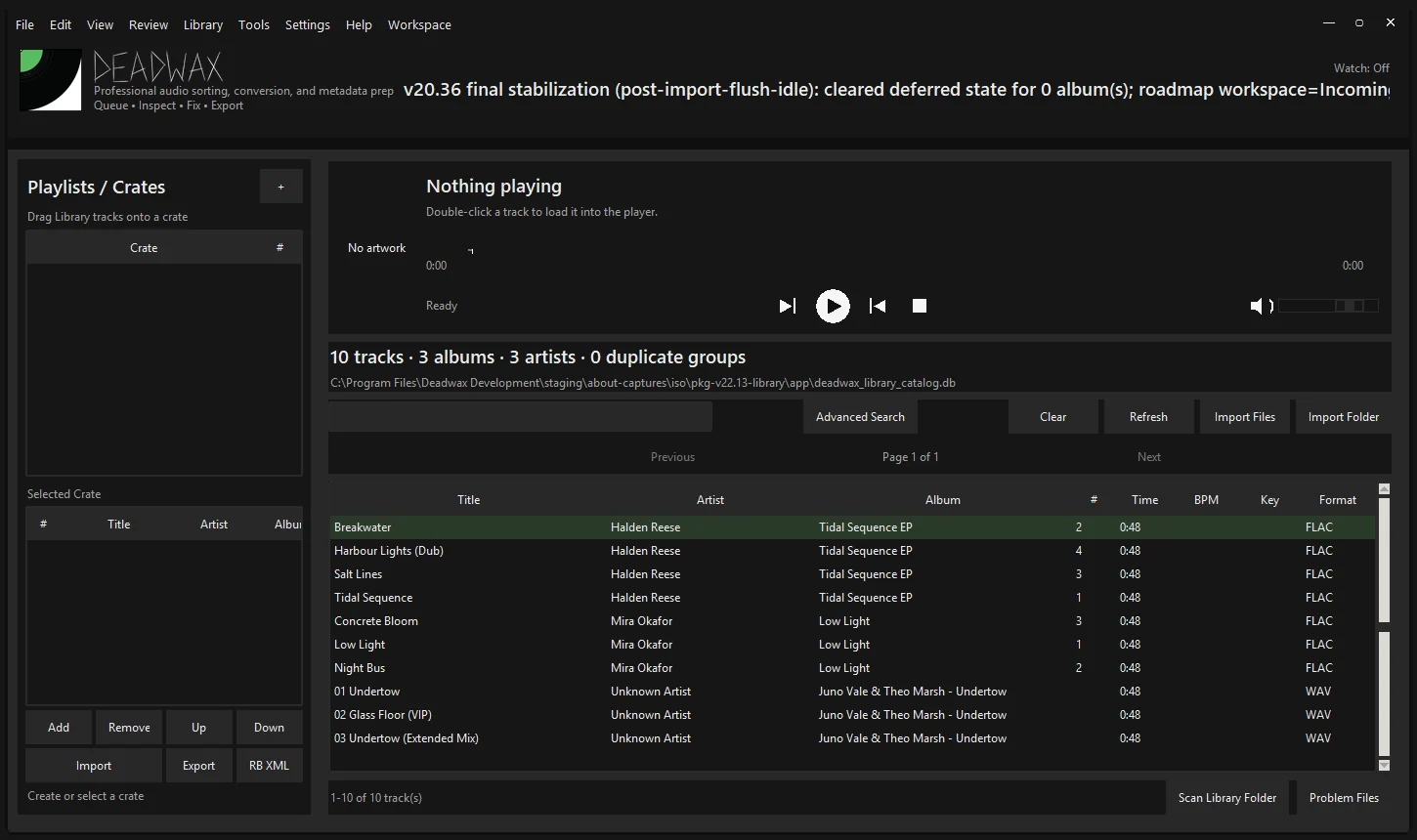
  • v22.1 – v22.36 Crates and playlists, a full-track player, drag-and-drop import, smart crates, a metadata repair centre.
  • v22.13 rekordbox XML import and export.
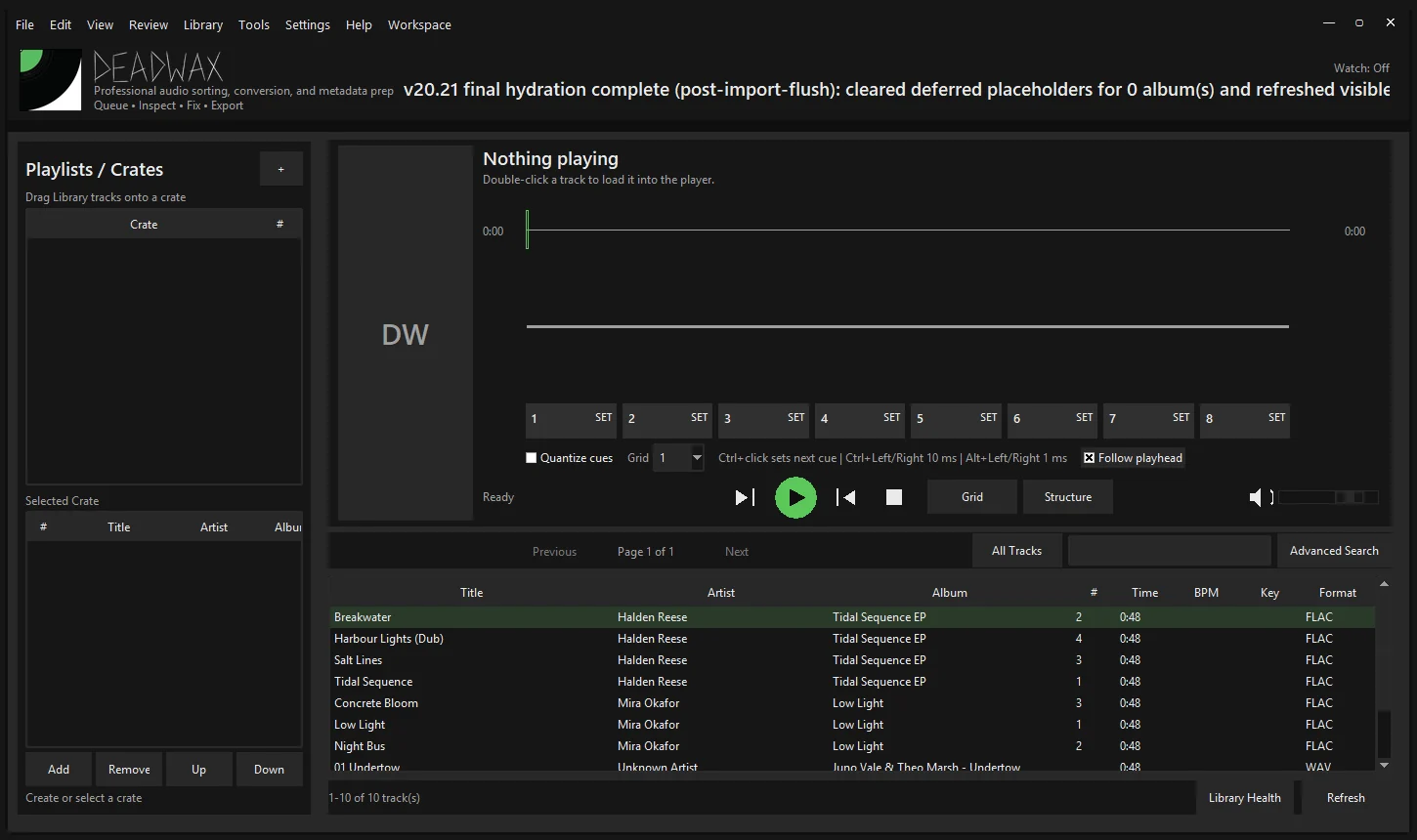
  • v22.37 – v22.58 Cue points, beatgrids and phrase markers; three-band colour waveforms with a fixed-playhead detail deck.
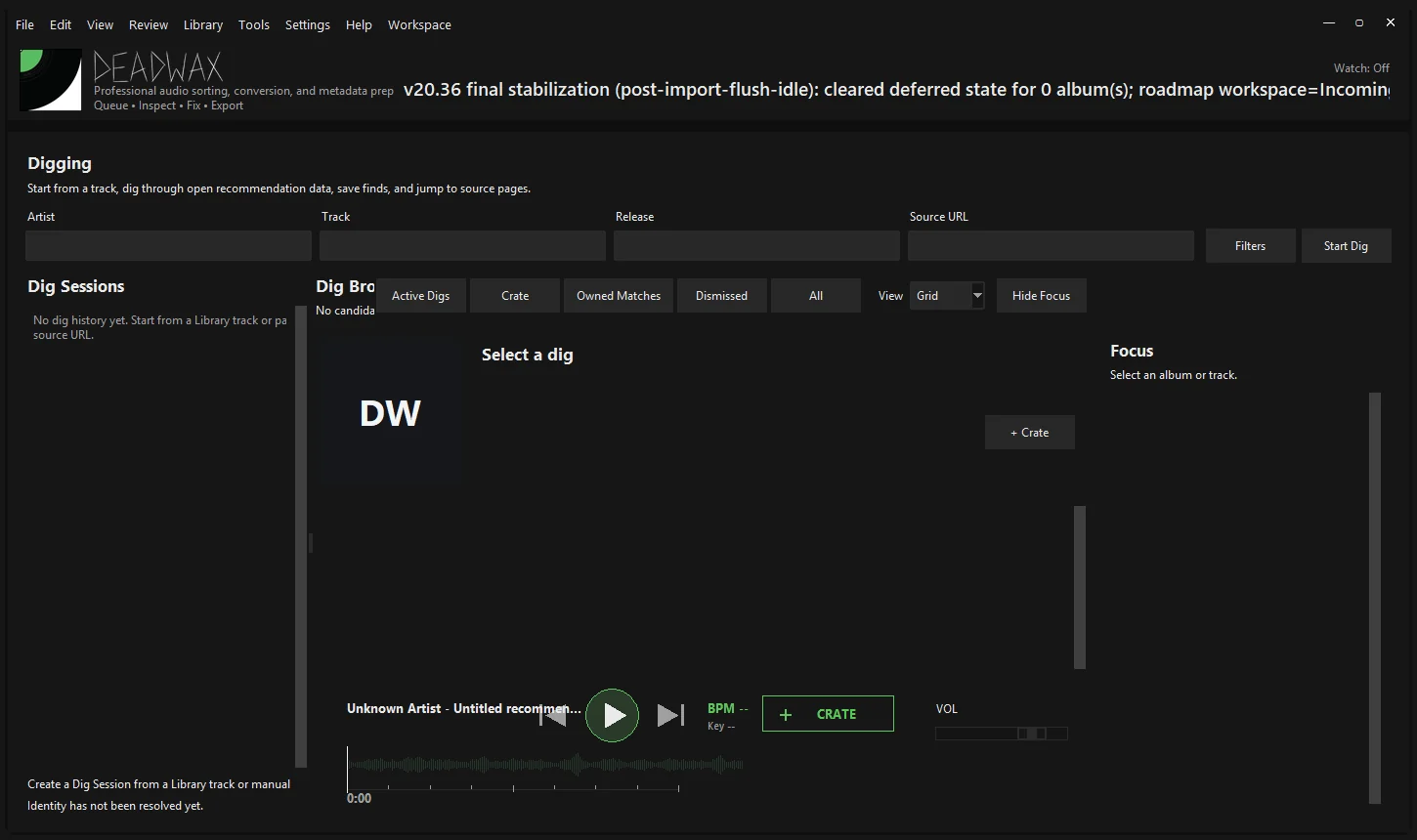
  • v22.59 – v23.82 Digging: Bandcamp collector trails, cards, saved finds and a preview deck, then SoundCloud.
Deadwax v22.13: The Library workspace: crates, a full-track player, paging and rekordbox XML import and export.
v22.13June 2026The Library workspace: crates, a full-track player, paging and rekordbox XML import and export.
Deadwax v22.58: Eight cue pads, quantize and a fixed-playhead detail deck above the Library.
v22.58June 2026Eight cue pads, quantize and a fixed-playhead detail deck above the Library.
Deadwax v23.30: Digging: sessions, a card browser, a Focus panel and a preview player with a waveform.
v23.30June 2026Digging: sessions, a card browser, a Focus panel and a preview player with a waveform.

The rebuild

Deadwax v12.26 – v18.24 · July – October 2026235 archived builds

A ground-up rebuild on Qt, with a written architecture and a full test run for every build.

  • v16.0 The first beta with an installer.
  • v16.28 An in-house analyzer for tempo, beats, downbeats and key, allowed to say when it isn’t sure.
  • v17.0 – v17.11 Prepare redesigned, then Perform: a live 2- and 4-deck surface with sync, auto gain and controller profiles.
  • v17.75 The first Mac build.
  • v18.3 – v18.24 Two-way sync with Traktor, Serato, Engine DJ, Mixxx and VirtualDJ; phrases, Auto Cues, stems, Ableton Link, OSC and a step sampler.
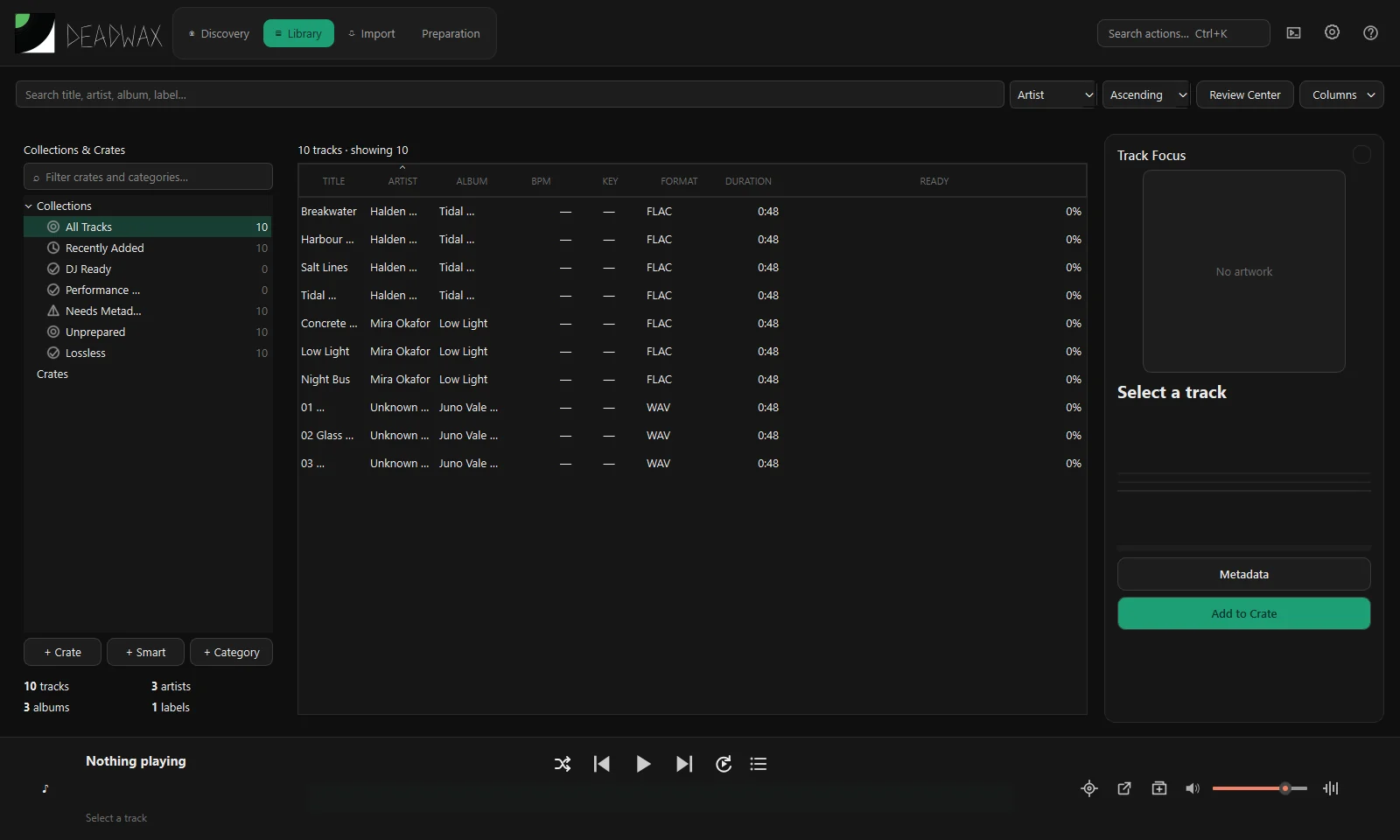
Deadwax v15.33: The Qt rebuild: Discovery, Library, Import and Preparation as tabs, crates and smart collections on the left.
v15.33August 2026The Qt rebuild: Discovery, Library, Import and Preparation as tabs, crates and smart collections on the left.
Deadwax v17.6: The first Perform: two decks, scrolling waveforms, a mixer, hot cues, loops and EQ.
v17.6September 2026The first Perform: two decks, scrolling waveforms, a mixer, hot cues, loops and EQ.
Deadwax v18.24: Prepare: overview and detail waveforms, hot cues with 16 colours, memory cues, loops and a Library browser.
v18.24October 2026Prepare: overview and detail waveforms, hot cues with 16 colours, memory cues, loops and a Library browser.
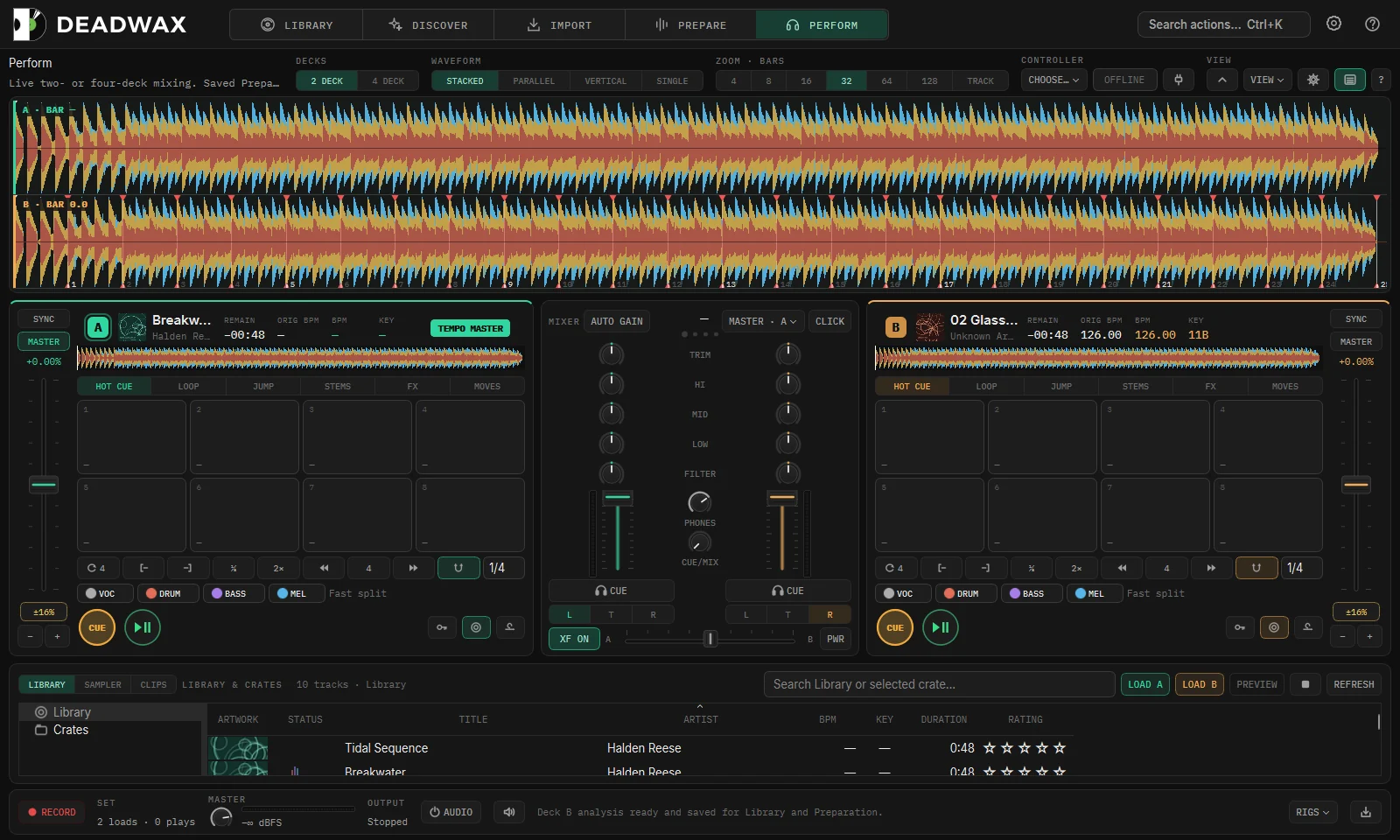
Deadwax v18.24: Perform with stacked waveforms, stem buttons, beat FX and a sampler, the last build named Deadwax.
v18.24October 2026Perform with stacked waveforms, stem buttons, beat FX and a sampler, the last build named Deadwax.

Otori

Otori 1.0 – 1.17 · October – November 202638 builds, Windows and Mac

A new name, the spiral logo and the pixel wordmark. Numbering restarted at 1.0.

  • 1.1 Automatic update checks, Mac Intel builds and the first Apple Silicon build.
  • 1.2 – 1.10 A Library that stays fast with music on a NAS; Bandcamp digs in seconds; SoundCloud follows the dig.
  • 1.14 A cleaner interface across all five workspaces, designed screen by screen.
  • 1.16 – 1.17 The Waveform look window, and waveforms that show the rhythm.
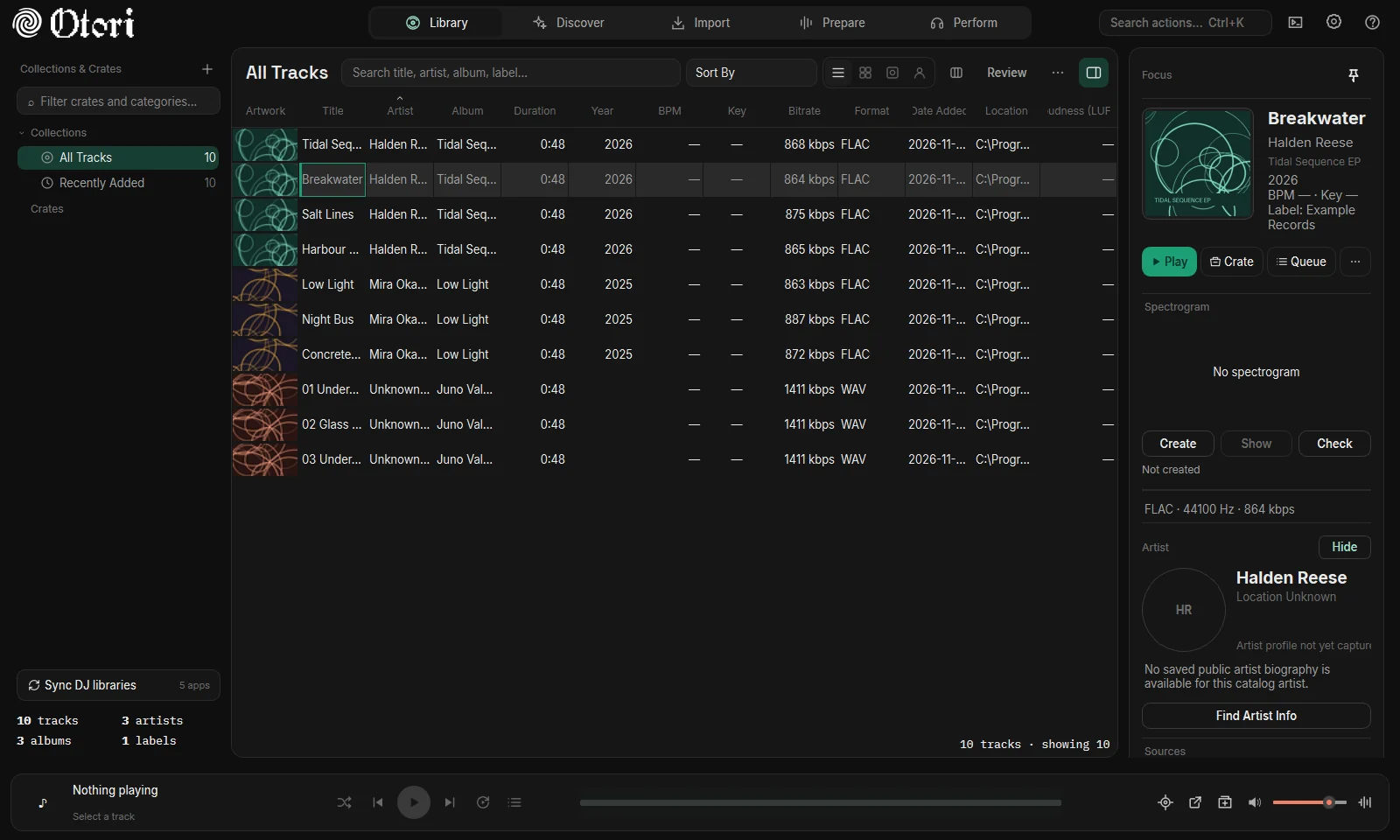
Otori 1.14: The 1.14 redesign: pill tabs, line icons, raised sheets and a Focus panel beside the Library.
1.14November 2026The 1.14 redesign: pill tabs, line icons, raised sheets and a Focus panel beside the Library.
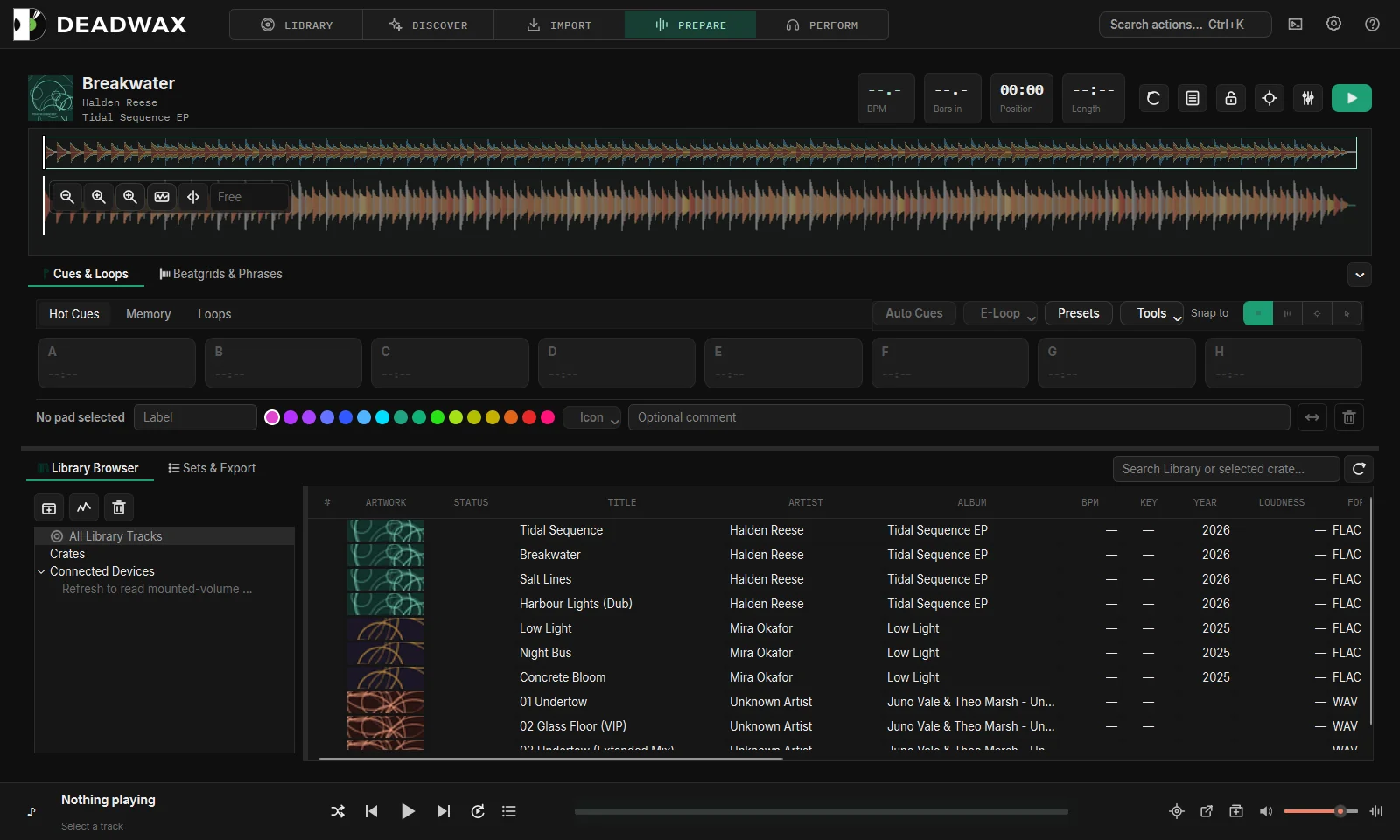
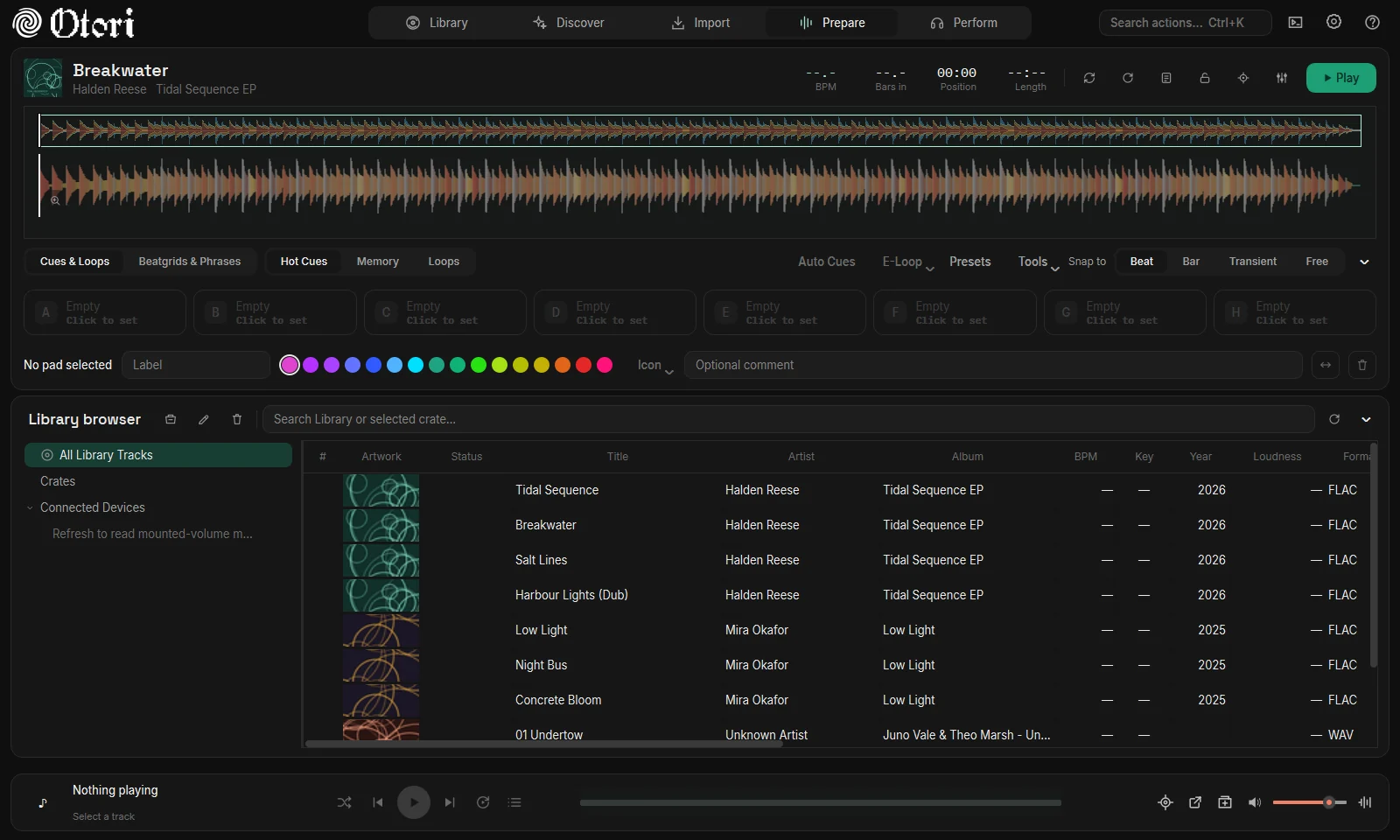
Otori 1.17: Prepare in 1.17, with the rhythm waveform: bass-led colour, so kicks and breaks read at a glance.
1.17November 2026Prepare in 1.17, with the rhythm waveform: bass-led colour, so kicks and breaks read at a glance.
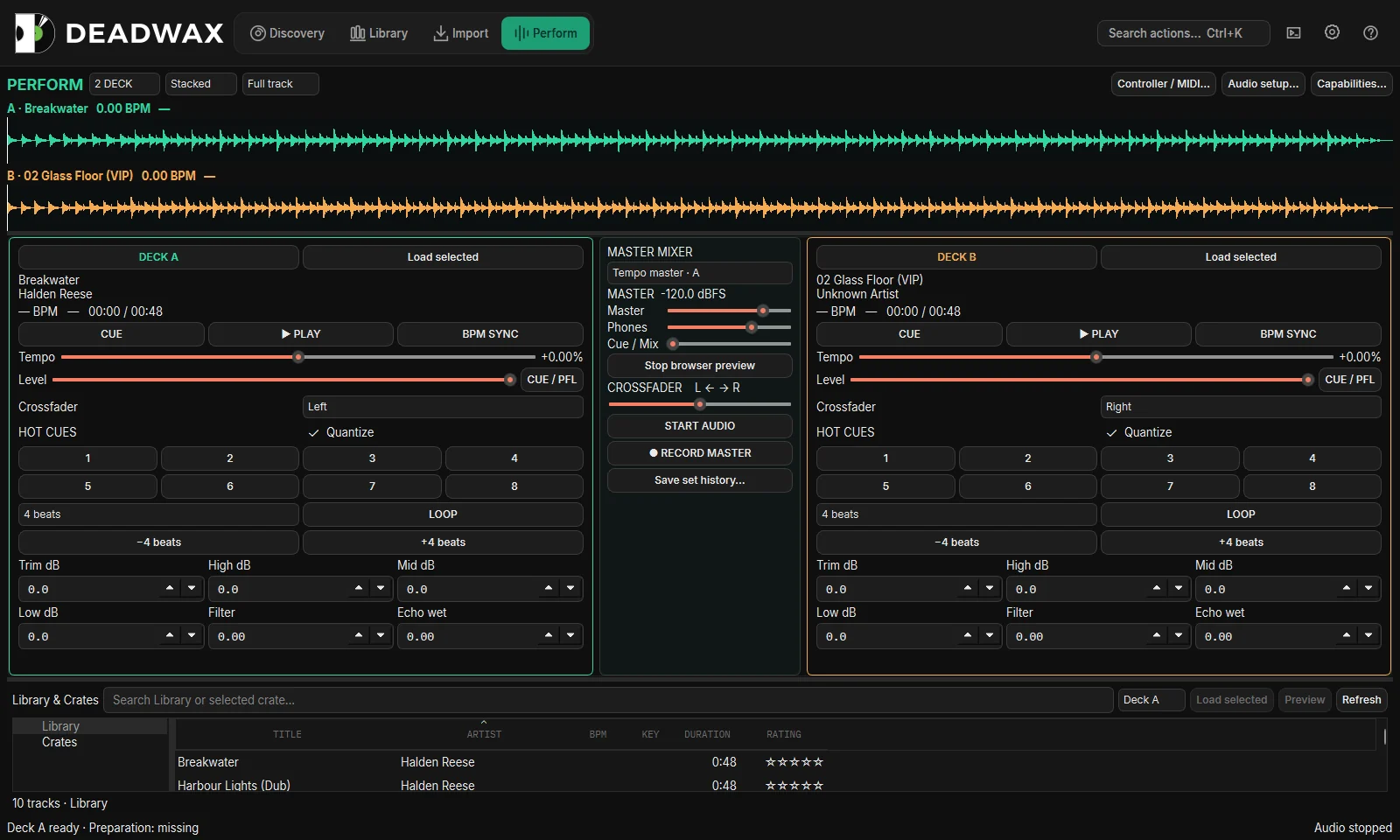
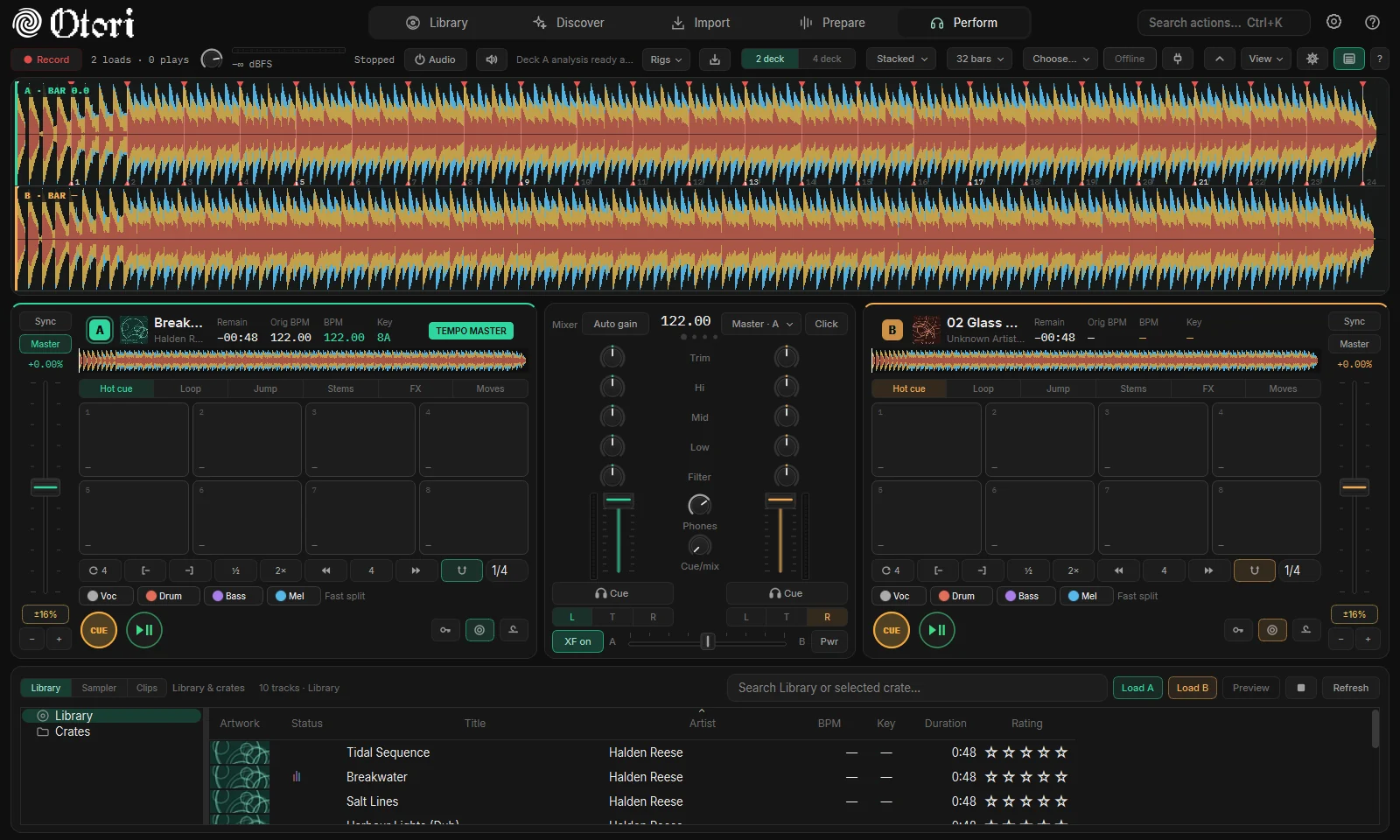
Otori 1.17: Perform in 1.17: two decks with tempo master, stems, mixer and the Library browser underneath.
1.17November 2026Perform in 1.17: two decks with tempo master, stems, mixer and the Library browser underneath.
What carried through · 原則

Rules that survived every rewrite

[ OK ]

Preview before change

From the first dry run to Process Selected, nothing touches a file until you have seen what will happen.

[ OK ]

Undo by default

History and undo, backups before every sync, rollback, track locks.

[ OK ]

Measure, then change

Benchmarks for the analyzer, profiling for scrolling and idle use, a test count in every release note.

[ OK ]

Work with other DJ apps

Two-way sync with Traktor, Serato, Engine DJ, Mixxx and VirtualDJ; rekordbox through its own XML and USB formats.

The next chapter is yours.

Otori is in public beta on Windows and Mac.

Download

Drawn from the archived builds and the release notes inside them. The first sorter (v6 – v9), the earliest Qt builds and a handful of late v24 builds survive as notes only, so they are named but not drawn.